←Back
←Back
Choose the path that fits your goal
About

The AI-X Framework began with a pressing question: How do we know whether an AI tool genuinely supports learning?

As AI adoption accelerates across higher education, technical functionality alone is insufficient. A tool may perform as intended yet fall short pedagogically.

Guided by ASU's Principled Innovation framework, we brought together educators, designers, researchers, and academic and technology leaders to examine AI as it is actually being used in learning contexts. Rather than starting from abstract principles, we focused on the practical decisions tool creators face and the real impacts those decisions have for learners and instructors. This work resulted in a suite of three complementary tools that empower practitioners to ask essential questions: Does this AI tool respect learner agency and judgment? Is its use aligned with educational goals and learning sciences? Are limitations, risks, and sources of error made visible? Does the tool support human thinking and relationships rather than displacing them?

The AI-X Framework is not a compliance checklist or scoring system. It is a reflective instrument intended to surface key choices, tradeoffs, and areas for growth, supporting more deliberate and responsible AI-mediated learning experiences in higher education.

Acknowledgement

This research was supported by the Kern Family Foundation and the Institute of Education Sciences (IES) Active Learning at Scale (Active L@S) grant. Special thanks to our codesign partners on the design team and community of practice and colleagues at the Learning Engineering Institute (opens in a new tab), particularly our software development team.

For licensing and citation information please refer to the FAQ section below.

FAQ
Choose the path that fits your goal
About

The AI-X Framework began with a pressing question: How do we know whether an AI tool genuinely supports learning?

As AI adoption accelerates across higher education, technical functionality alone is insufficient. A tool may perform as intended yet fall short pedagogically.

Guided by ASU's Principled Innovation framework, we brought together educators, designers, researchers, and academic and technology leaders to examine AI as it is actually being used in learning contexts. Rather than starting from abstract principles, we focused on the practical decisions tool creators face and the real impacts those decisions have for learners and instructors. This work resulted in a suite of three complementary tools that empower practitioners to ask essential questions: Does this AI tool respect learner agency and judgment? Is its use aligned with educational goals and learning sciences? Are limitations, risks, and sources of error made visible? Does the tool support human thinking and relationships rather than displacing them?

The AI-X Framework is not a compliance checklist or scoring system. It is a reflective instrument intended to surface key choices, tradeoffs, and areas for growth, supporting more deliberate and responsible AI-mediated learning experiences in higher education.

Acknowledgement

This research was supported by the Kern Family Foundation and the Institute of Education Sciences (IES) Active Learning at Scale (Active L@S) grant. Special thanks to our codesign partners on the design team and community of practice and colleagues at the Learning Engineering Institute (opens in a new tab), particularly our software development team.

For licensing and citation information please refer to the FAQ section below.

FAQ
Choose the path that fits your goal
About

The AI-X Framework began with a pressing question: How do we know whether an AI tool genuinely supports learning?

As AI adoption accelerates across higher education, technical functionality alone is insufficient. A tool may perform as intended yet fall short pedagogically.

Guided by ASU's Principled Innovation framework, we brought together educators, designers, researchers, and academic and technology leaders to examine AI as it is actually being used in learning contexts. Rather than starting from abstract principles, we focused on the practical decisions tool creators face and the real impacts those decisions have for learners and instructors. This work resulted in a suite of three complementary tools that empower practitioners to ask essential questions: Does this AI tool respect learner agency and judgment? Is its use aligned with educational goals and learning sciences? Are limitations, risks, and sources of error made visible? Does the tool support human thinking and relationships rather than displacing them?

The AI-X Framework is not a compliance checklist or scoring system. It is a reflective instrument intended to surface key choices, tradeoffs, and areas for growth, supporting more deliberate and responsible AI-mediated learning experiences in higher education.

Acknowledgement

This research was supported by the Kern Family Foundation and the Institute of Education Sciences (IES) Active Learning at Scale (Active L@S) grant. Special thanks to our codesign partners on the design team and community of practice and colleagues at the Learning Engineering Institute (opens in a new tab), particularly our software development team.

For licensing and citation information please refer to the FAQ section below.

FAQ

Web app · ASU Learning Engineering Institute

ASU Learning Engineering Institute

AI-X Framework

AI-X Framework

AI-X Framework

LEI researchers had 3 AI learning frameworks for responsible AI in teaching. I designed the web app that turns them into one guided workflow. I distilled input from 20+ focus group participants under its 8 themes and 24 criteria. My own QA pass logged 40+ design-QA findings against the build.

TEAM

Stakeholder · Product owner · Developer · Me

TIMELINE

Nov 2025 to May 2026

TOOLS

Figma · Asana

At a glance.

20+

focus group participants

focus group participants

across pilot and Community of Practice sessions

8

themes

themes

in the evaluation rubric

24

criteria

criteria

three per theme

3

AI learning frameworks

AI learning frameworks

in one guided workflow

40+

design-QA findings

design-QA findings

logged against the build

8

changes

changes

from the action-items document

Three frameworks, one product.

The AI-X Framework helps educators and designers plan and review AI-powered learning experiences. It brings three tools together. AI-X Compass helps people see where they stand in their AI project and where to start. AI-X Guide walks them through a structured evaluation of an existing tool, with reflection prompts along the way. AI-X Toolkit offers practical resources for each phase of the work.

The underlying research is dense. The evaluation alone has 8 themes. Each theme has three criteria, 24 in all. Every criterion is marked with one of 4 implementation statuses. The toolkit follows 5 Learning Engineering phases. PET mapping scores ideas on 4 dimensions: overall fit, pedagogy, experience, technology.

The frameworks existed only as research.

LEI researchers had built three research-backed frameworks for responsible AI innovation, but people couldn’t use them as one system yet. I started from the SRS document and listed what the product had to handle: how the three frameworks relate, the routing between them, the evaluation structure, a scenario-based entry and a way to save an evaluation and return to it.

A first-time visitor wouldn’t know how the frameworks relate to each other. Asking them to pick one on the first screen would stall them before they started.

Start from a goal.

I designed the entry around what people want to do. They pick one of three goals, like shaping an idea or checking a prototype, and the site points them to the tools that fit.

Flow diagram: Shape an idea leads to AI-X Compass, Check a Prototype leads to Compass or Guide, and Build responsibly leads to Guide or Toolkit.

Figure 1. The scenario-based entry, where two of the goals branch to more than one tool.

Working up from paper.

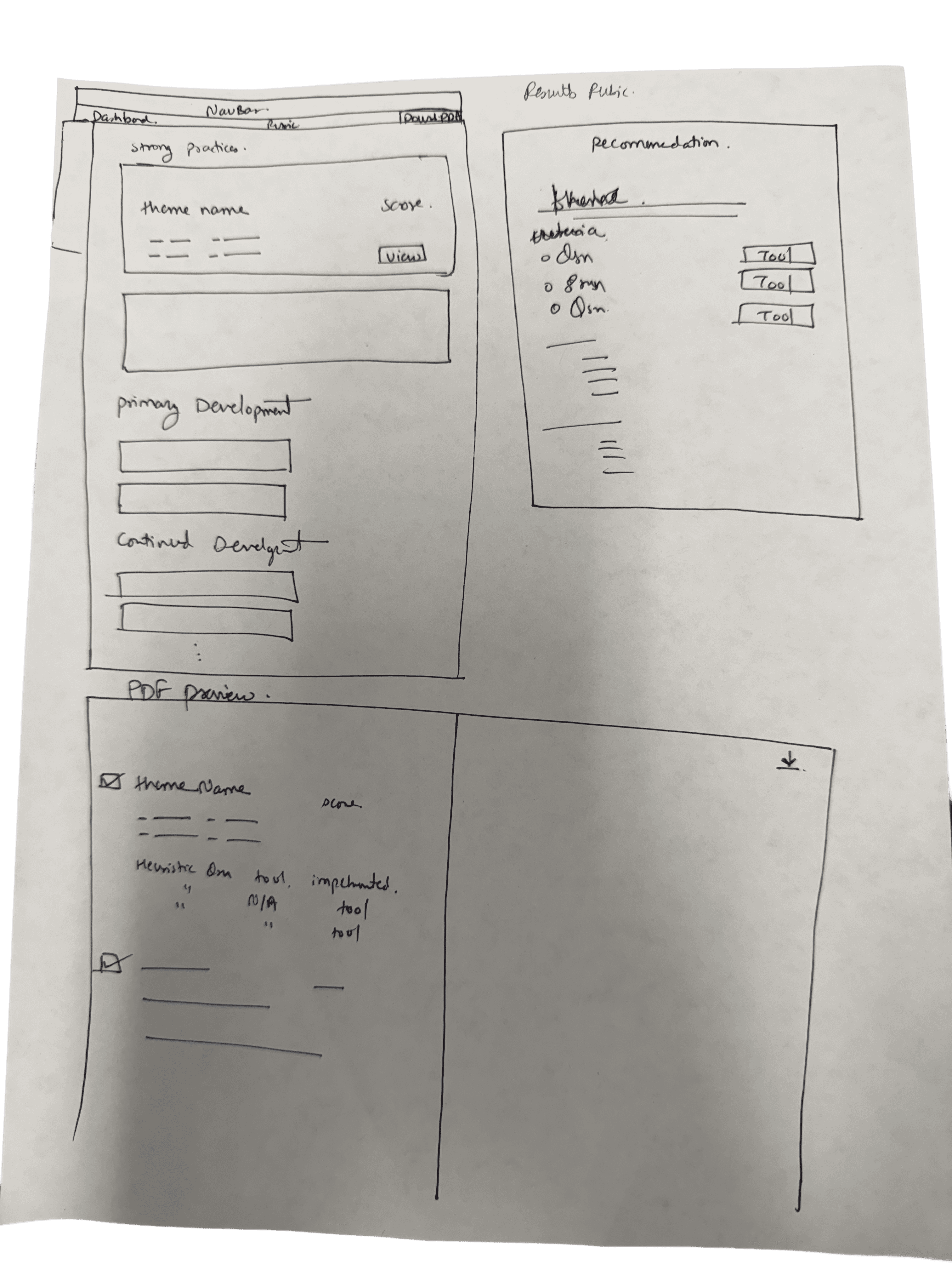
I sketched several structural layouts on paper before settling on a modular, guided system.

Paper sketch of the page layout
Paper sketch of the dashboard
Paper sketch of the rubric flow

Figure 2. Paper sketches of the system layout, drawn before any wireframes.

The low-fidelity wireframes set the rules for the rubric: a clear hierarchy, accordions for dense criteria, themes in sequence, save-for-later, visible scoring feedback and a design for every criterion state.
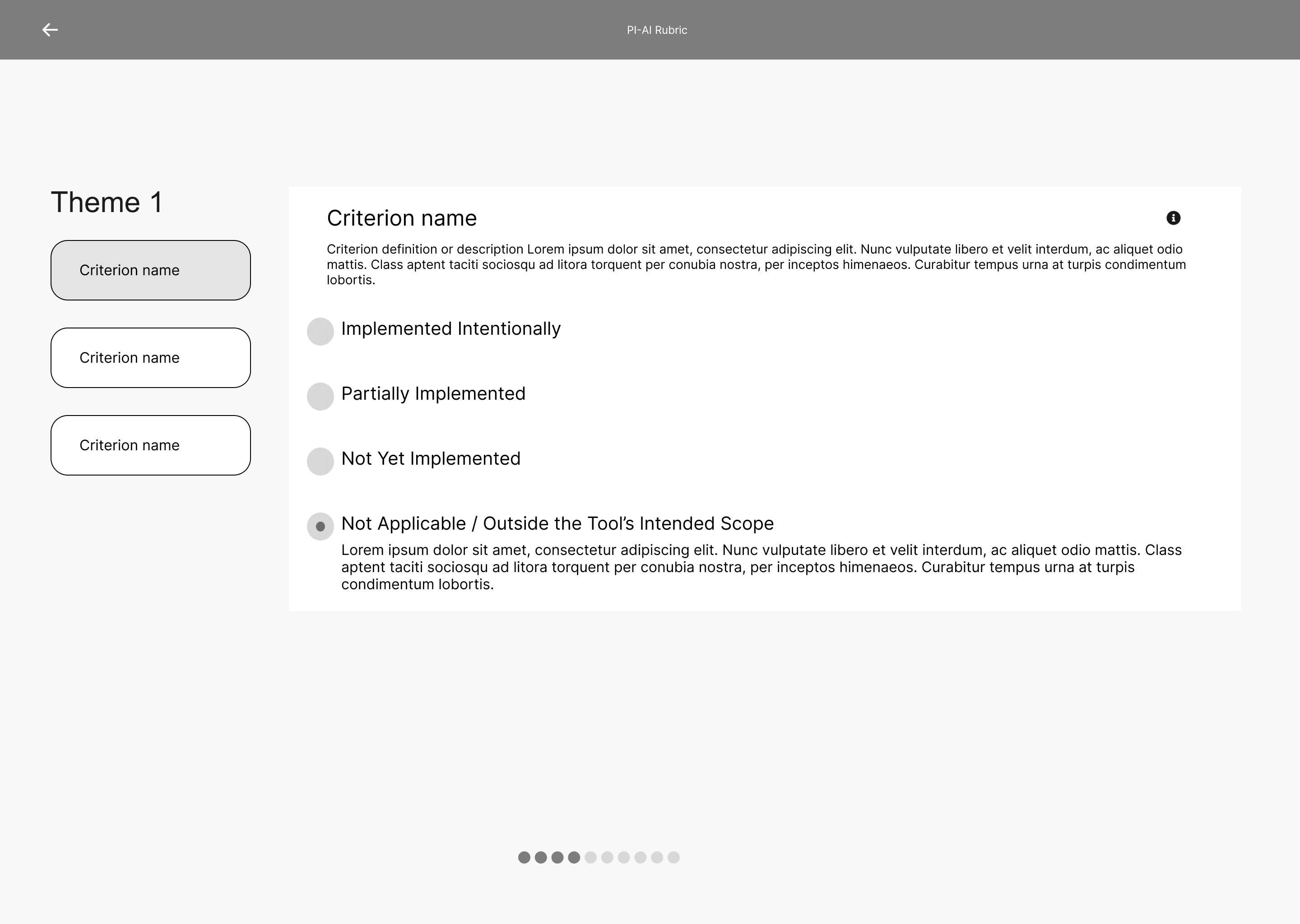
Low-fidelity criterion screen with implementation status options
Low-fidelity theme list with collapsed criteria

Figure 3. Two low-fidelity rubric screens, with criteria in accordions and a Save for Later button.

In high fidelity I designed each tool’s workflow and every rubric section, including the screens for PET ratings and score results. Export and resume logic followed, then the landing page.
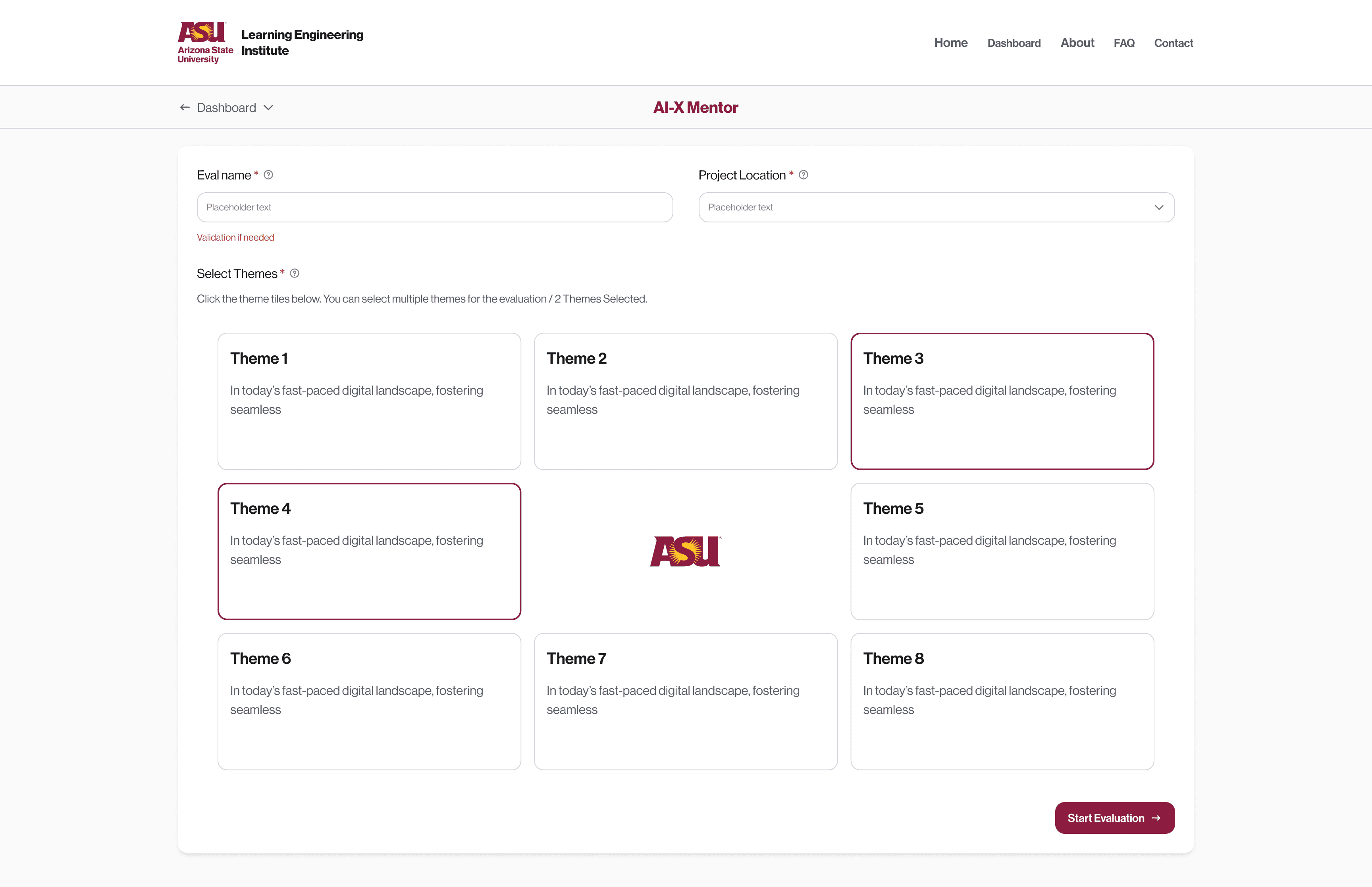
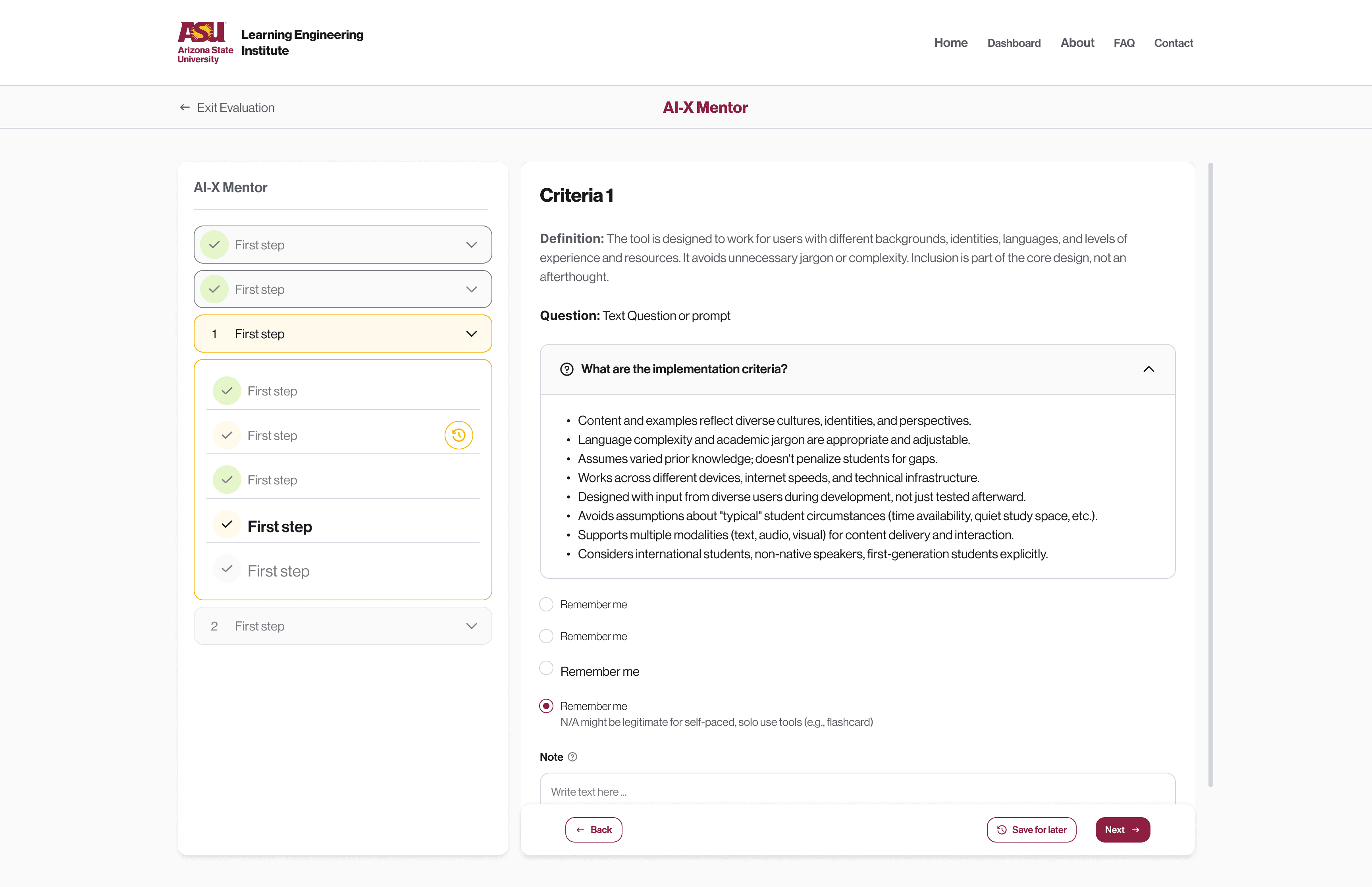
Theme selection screen
A single criterion with implementation status
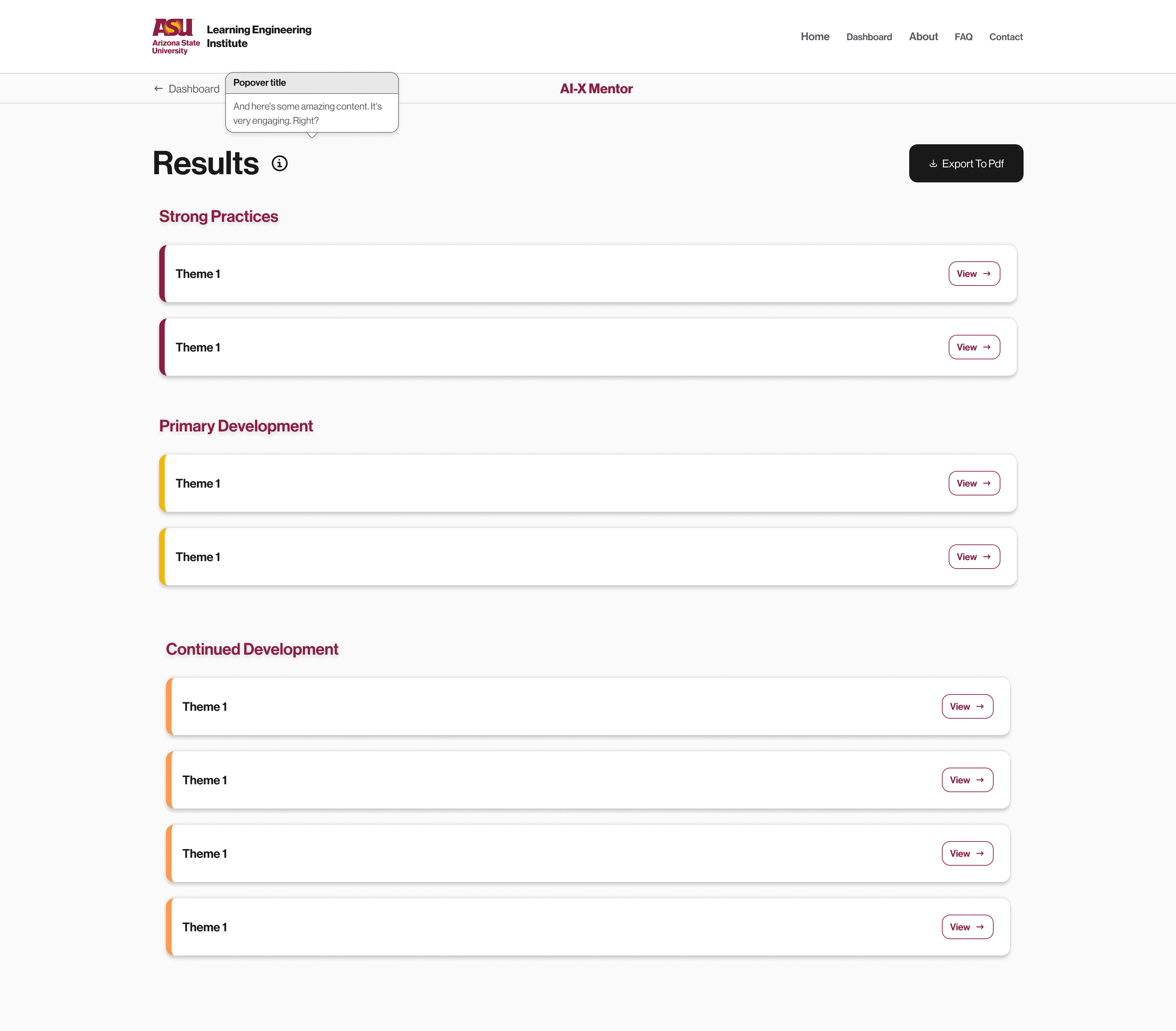
Results grouped into strong practices, development and continued development
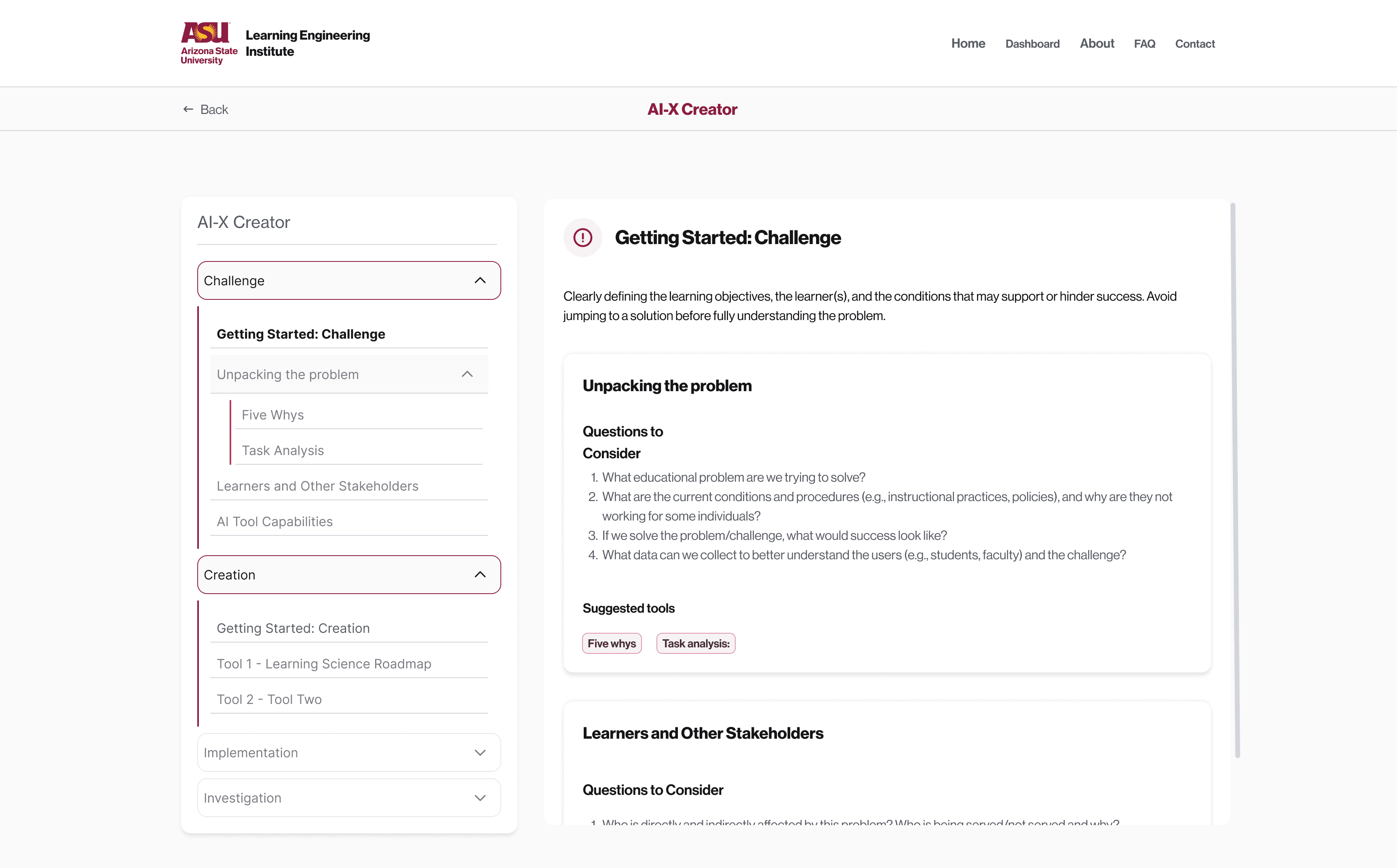
Toolkit page for the Challenge phase

Figure 4. Four high-fidelity screens from the evaluation flow and the toolkit.

A dashboard for work in progress.

I added a dashboard so people can manage several evaluations, group them by project and pick up where they left off. Evaluations sit in project folders and move between them by drag and drop. Each one shows whether it’s completed or still in progress.
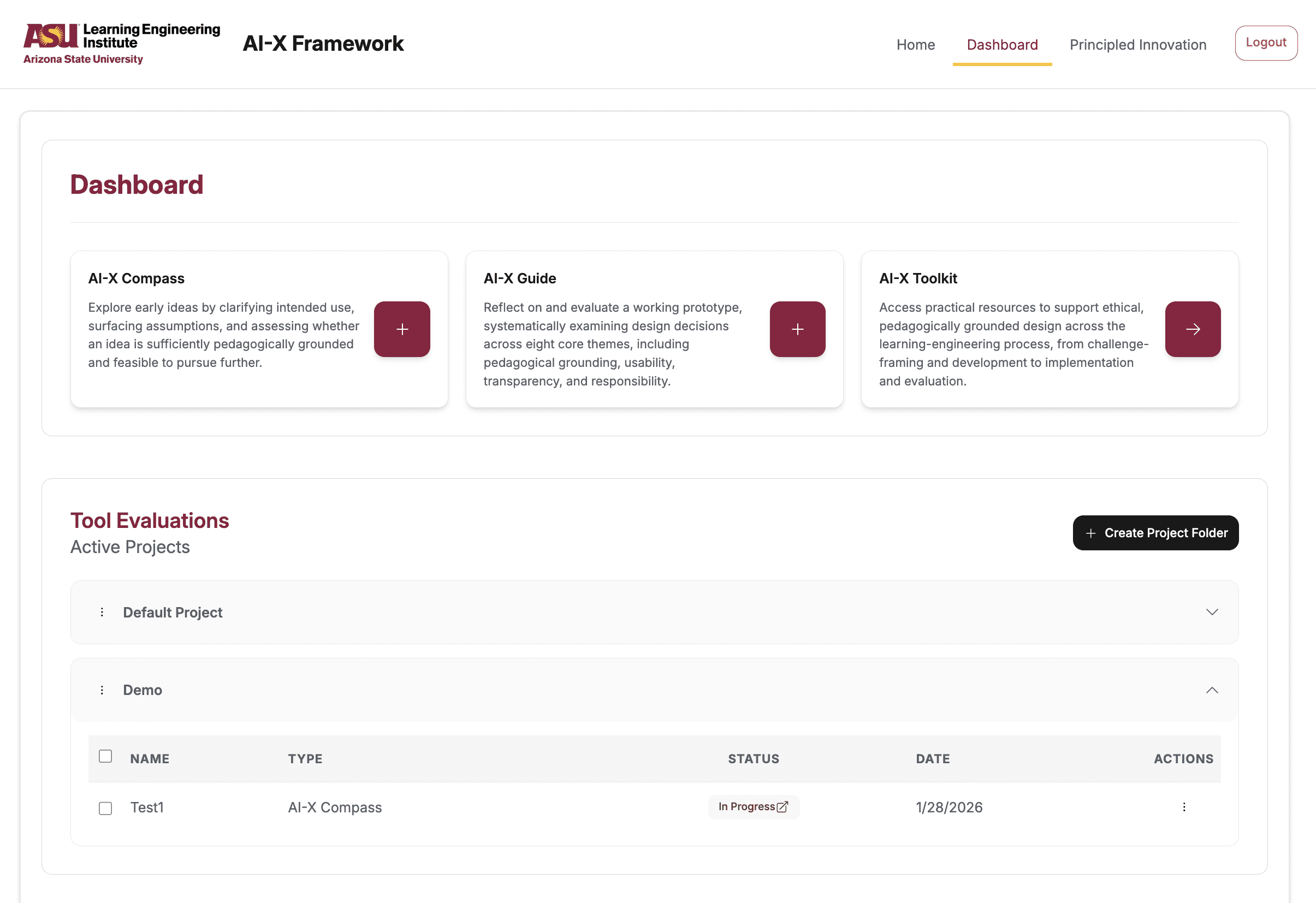
Dashboard with the three tools and a list of evaluations grouped in project folders

Figure 5. The dashboard with project folders and the status of each evaluation.

What the focus groups changed.

The team ran focus groups with 20+ participants across sessions, from a pilot in late September 2025 to Community of Practice sessions in spring 2026. Every piece of feedback went into one action-items document, with a High, Medium or Low priority vote and a developer note linking the pull request.

WHAT PARTICIPANTS SAID

WHAT SHIPPED

The Create Project button is difficult to find.

High. A Create Project button inside both evaluation flows, project made a required field, and the first folder opens on the dashboard.

Participants struggle to find their completed evaluations.

High. Evaluation Tools became Active Projects, with the first project folder open.

Can’t go back in the rubric to remove themes.

High. Themes became opt-in with clearer selection, and the back button became Exit evaluation, with a warning.

Eight changes came out of that document, each with a pull request reference. We declined a mobile layout, because the consensus was desktop first. De-selecting themes mid-evaluation was deferred, because it needed the evaluation deleted and recreated in the database.

AI-X Guide setup screen with evaluation name, required project and eight theme cards, two selected

Figure 6. Setting up an AI-X Guide evaluation: the project is a required field, and themes are opt-in cards that highlight when selected.
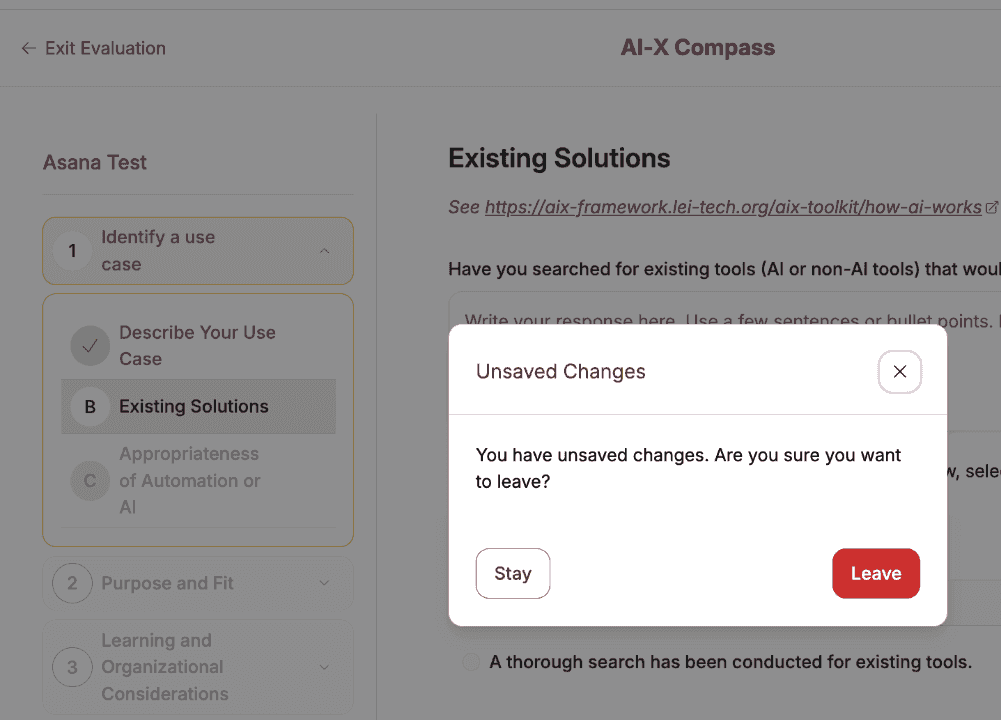
AI-X Compass evaluation with an Unsaved Changes dialog offering Stay or Leave

Figure 7. Exit evaluation asks before leaving, because going back mid-evaluation lost work.
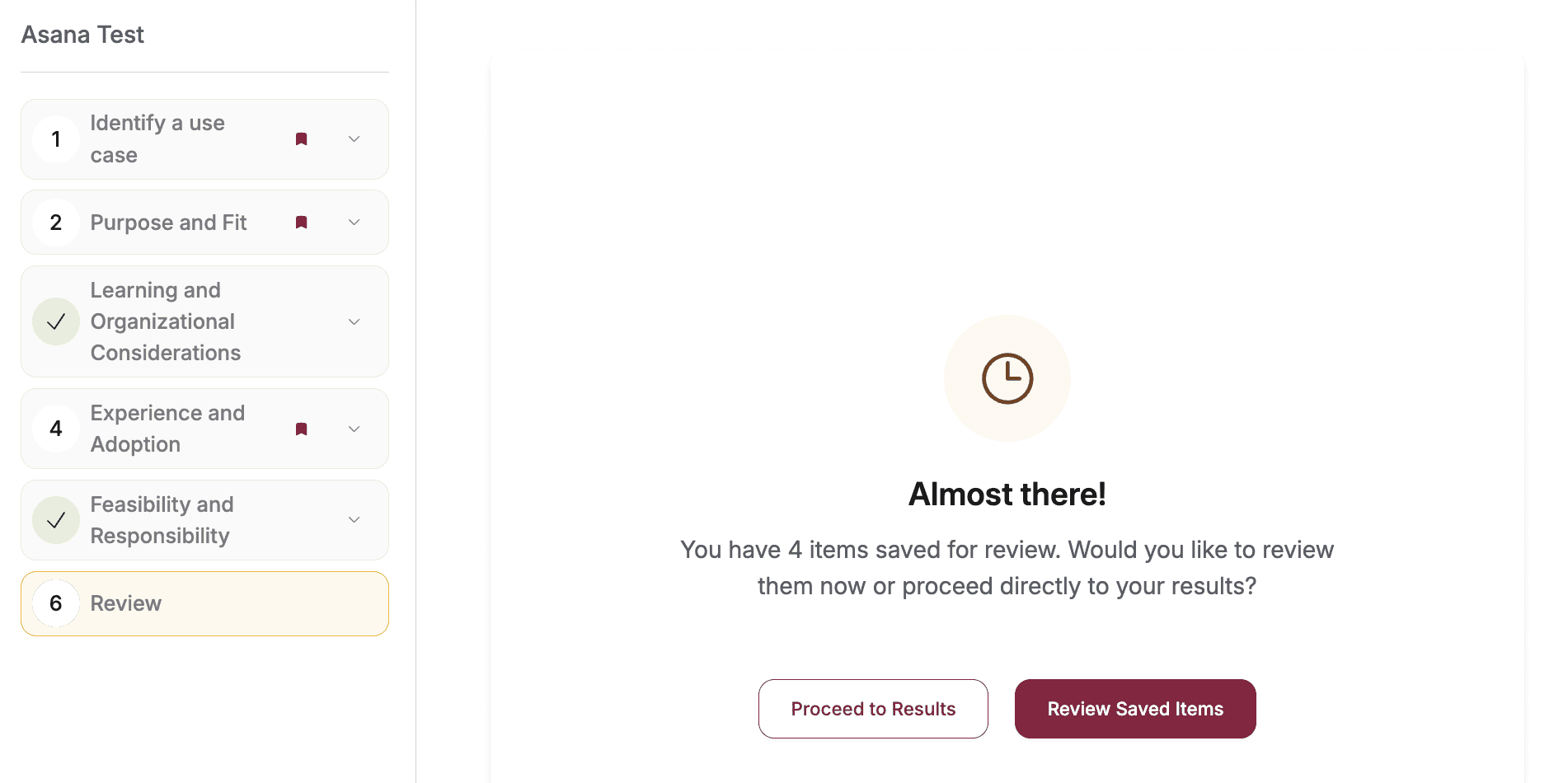
AI-X Guide review step listing 4 items saved for review, with Proceed to Results and Review Saved Items

Figure 8. The review step at the end of an evaluation, where items marked for review wait before the results.

Design QA against the build.

I ran my own QA pass on the running app and logged 40+ design-QA findings in one document: 22 on the dashboard, 17 on the Compass and 4 on the rubric.

Most were about states and words. Selected and saved states looked alike in the sidebar, and the rubric’s selected state read as an error. One action went by three names, from mark for review to review saved items. On the Compass, the buttons moved when you clicked Previous Question several times fast, which breaks muscle memory on a 24-criteria pass.

From the QA doc: AI-X evaluation sidebar with completed, current and marked-for-review sections, beside the button row with Mark for review

Figure 9. From my QA doc: sidebar states for completed, current and marked-for-review sections, and the button row with one of the three names for the review action.

I tracked the focus-group fixes from their High, Medium or Low priority to the merged pull request. Then I wrote a 50-case verification suite in Asana, 18 cases on the Guide, 18 on the Compass and 14 on the dashboard. All 50 were closed by May 7, 2026.

Launched and live.

The AI-X Framework launched and is live on the LEI site.

Two choices carried most of the design. People start from a goal, and accordions keep every criterion readable without crowding the page.

Project takeaways.

01
Route people by goal
The entry asks what you want to do and points you to the tools that fit. A first-time visitor can start without knowing how the frameworks relate.
02
Follow feedback to the merge
Input from 20+ participants went into one action-items document, and each fix carried a priority and a pull request reference.
03
QA the build as a designer
40+ findings on states, wording and layout, logged against the running app, then a 50-case suite to confirm the fixes landed.

Next case study

DADO, luxury gifting owned end to end

Read the case study →

DADO account dashboard, the next case study