Web app · ASU

Tough Talks lets education students and practicing educators at ASU’s Mary Lou Fulton Teachers College practice difficult conversations with an AI role-play bot. A third party built the bot. In September 2025 I designed and shipped the site around it in under 48 hours, with ASU sign-in, and left the bot’s own interface untouched.
TEAM
Solo, for a non-technical client
TIMELINE
Sep 2025, under 48 hours
TOOLS
FigJam · Figma · v0 · Vercel
A working bot with nothing around it.
When I joined, the client’s chatbot worked but sat alone on a single page. It had no navigation, no onboarding, no way to find conversation types and no way to collect feedback.
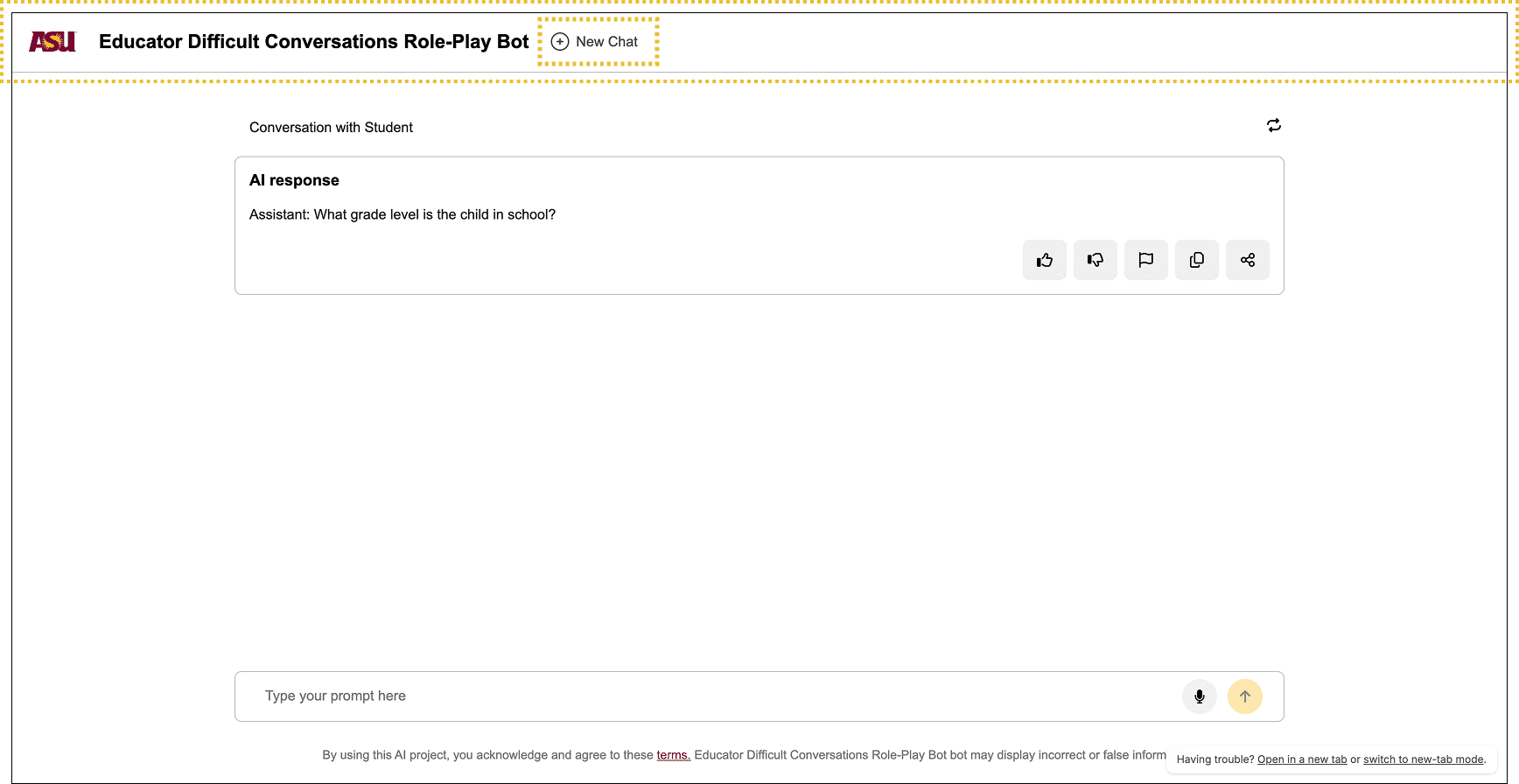
Figure 1. The client’s bot as it looked before I designed the product around it.
The bot’s interface was locked. It shipped with its own navigation bar and its own controls (New Chat and a collapsible menu). A standard app shell on top would have given people two navigation bars and no clear sense of where they were.
Two layers, each with its own navigation.
I split the product into a shell and a chat page. The shell owns the main navigation and the structure of the site. The chat page has a minimal navbar of its own, so the embedded bot keeps its built-in controls and nothing appears twice.
A hub that grows with the client
Conversation types live in a Conversations hub. Each type opens a chat page with the same embedded bot, so a new type is one new hub entry. The client supplied the first three types: students, K-12 parents, colleagues.
FAQ and survey
The FAQ page covers privacy, scope, session length and how the bot guides a conversation. The survey page collected feedback without any change to the bot. The client later took the survey down, because they wanted responses only from IRB-certified members.
I mapped the structure first.
Before building anything, I mapped the site in FigJam. Home leads to the conversations hub, and each conversation type opens its own chat page. The FAQ and the survey hang off the main navigation.
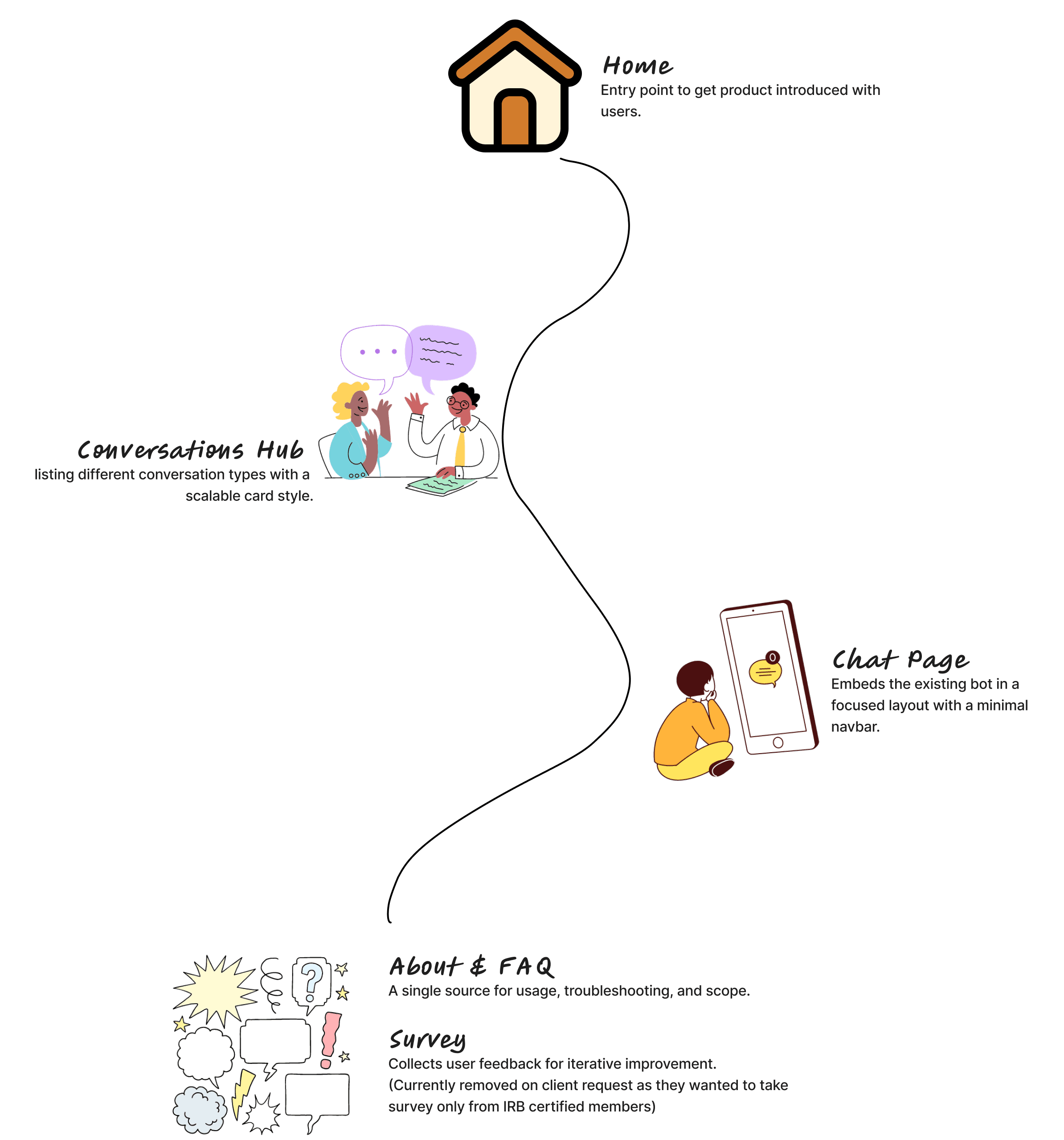
Figure 2. The site map I drew in FigJam before any code existed.
Building it in under 48 hours.
The timeline was short, so I built the site with AI tools. I wrote one detailed prompt covering pages, routes, navigation and the ASU color palette, then gave it to Replit, Lovable, Bolt and v0. v0 produced the cleanest foundation.
Build a public GitHub repo called tough-talks. Tech stack: Next.js 14 (App Router) with TypeScript, Tailwind CSS, React-icons, shadcn/ui. Pages & routes: / Home, hero (H1: Mastering Tough Talks), two CTA buttons (Start Now, Learn more / FAQ), illustration placeholder. /chat, full-width iframe that loads BOT_IFRAME_URL env var, inside a card component with heading “Educator Conversational Role-Play Bot”. /faq, accordion list with four sample questions + answers. /survey, centered text, one CTA button to SURVEY_URL env var. Navigation bar: ASU logo left, links (Home | Chat | FAQ | Survey) right, underline active link. Tailwind color palette: primary #8C1D40 (ASU maroon) and neutral grays. Add ESLint + Prettier config, Tailwind base/styles/utilities, and a README that includes local dev steps (pnpm dev). Output a complete repo I can download or push public.
Figure 3. The prompt I gave all four tools, lightly reformatted for reading.
From there I shaped it by hand. I designed the visuals in Figma and matched them in code. I set up routing for each page, put every protected route behind ASU single sign-on and embedded the bot in an iframe so its interface stayed separate. Then I deployed it to Vercel through GitHub.
What the client ended up with.
In under 48 hours the client’s single chat page became a site people can move around in, with a conversations hub and an FAQ behind ASU sign-in. The bot itself runs exactly as its builder delivered it.
Most of the work was deciding what surrounds the bot and where each piece of navigation belongs.
Next case study
DIAL, an inclusion assessment library
Read the case study →

Anchal Nagdev